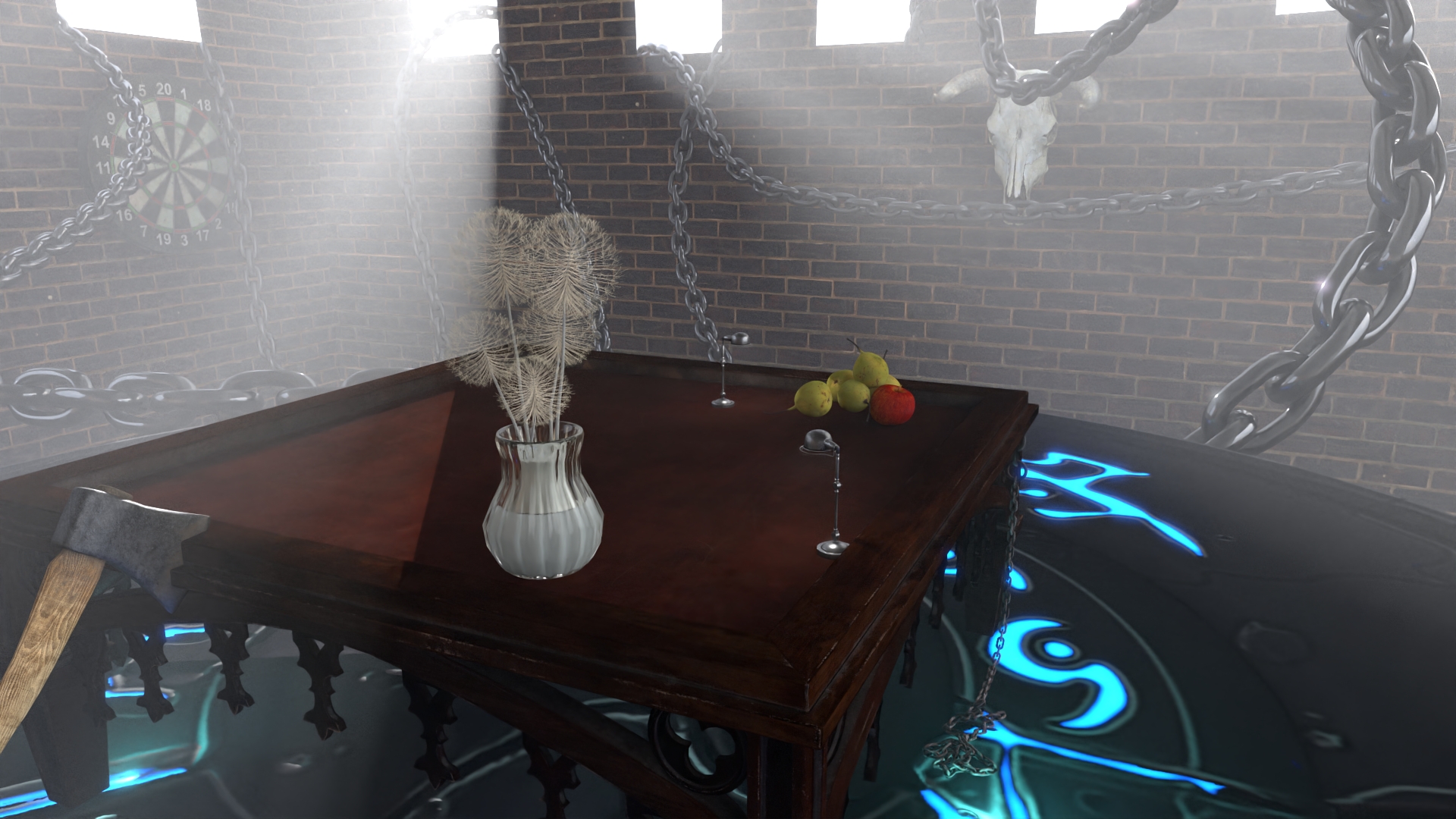
I made this image because I wanted a final render that shows off lighting + atmosphere with a mix of different materials and props. I originally thought about doing volumetrics/subsurface, but I changed direction and built a simple room scene where the main action comes from small details like the dandelions, chains and uniform fogs.
The goal was a calm but slightly weird mood: soft daylight coming through the windows, and fog so the light rays feel present. Some details are easy to miss, like the thin dandelion parts that rely on alpha masking but not real geometry, the bloom glow around bright areas.
Description: Uses a mask texture to let the light pass through some parts of the objects.


Summary of Implementation:
include/lightwave/image.hpp to store the alpha values in the Image struct.alpha() function to Texture class to be able to read the alpha values stored in the Image class.Instance class.Image::loadImage() to read the alpha values from the image file into Image::m_alpha field.Instance::intersect() and in Instance::transmittance() functions. Based on the alpha value
randomly reject the intersection.The Biggest Challenge In Implementation:
Biggest challenge was this bug where I needed to revert the intersection if intersection was rejected. I was only reverting the Intersection.t but whole struct needs to be reverted. It took a while to find this bug.
Description: Creates glow around the bright areas in the image.


Summary of Implementation:
src/postprocesses/bloom.cppColor::luminance() function, then, the image first blured vertically then horizontally. The result then additively blended to the original image.The Biggest Challenge In Implementation: Tweaking with the parameters of the gaussian blur.
Description: Modifies the normals of the surface using a texture without adding geometry.


Summary of Implementation:
Instance class.Instance::transformFrame() function. The normal value is transformed from tangent space to world space.The Biggest Challenge In Implementation: The biggest challenge was dealing with the different coordinate system conventions. I did trial and error to do the correct transformation. The y coordinate needed to be flipped for example, otherwise, it looks like the brick dented inwards and shadows are in the wrong place.
Description: Removes noise from the image.


Summary of Implementation:
src/postprocesses/denoise.cppThe Biggest Challenge In Implementation: Setting up the OIDN library.
| Property | Value |
|---|---|
| Render Time | 2 hours 46 minutes 14 seconds |
| Cpu | Intel(R) Core(TM) i7-10875H |
| Samples Per Pixel | 669 |
| Resolution | 1920x1080 |
| Geometry | 1.114.406 vertices, 1.812.179 triangles |
Before starting the project I had these two sketches thinking that I would either implement volumetric rendering or subsurface scattering:


These are some of the reference images for those:


Then I ended up not implementing neither of those features so I abandoned those ideas. I implemented alpha masking so I thought something with leaves maybe confetti flying around would be nice to have in the scene. So I sketched this:

Kind of like a terrarium. I started looking for assets. I found a dandellion model with a vase but couldnt neither confetti or fireflies or something similar. I tried to model it myself but failed. And in the process I found other assets and end up having the scene that I had. I looked for 3D models like church or interior of old european buildings, palaces, castles but their interior were to detailed that I thought that it would violate the rule that rendering of a single asset is prohibited. So I modeled basically a cube with couple windows with the knife tool in blender. I wanted to have various kind of surfaces in the scene. There is an emissive surface, a dielectric surface, uniform fogs.
Emissive surface in a closed room
.jpg)
The final scene starts to form
.jpg)
Scene felt dark so I added more windows
.jpg)
Scene still felt dark so I added more windows to the back and sides of the cube

.jpg)
It felt too bright so I closed some of the windows back. I change the angle of the sun and also I wanted to see the light rays so I wanted to fake it using a semitransparent plane.

.jpg)
It looks fine in that image here but it doesnt look fine in the denoised image. I thought I was saving denoised images but it turns out I wasn't :(.
So I switched to uniform bounded fog instead:
.png)
.jpg)
Again in the noisy image the difference is not obvious but in the denoised image the difference was quite obvious.
It is not noticable in the noisy image but there is a very clear line at the boundary of the volume in the deniosed image so i beveled the edge of the volume thinking that i would get rid of the edge.
.png)
It didn't quite work the way I want it to work so I eventually removed the horizontal fog.
There is also little ambient fog in the scene.
I played with lighthing paramters a little bit.
.jpg)
The scene felt empty so I added more props.
.jpg)
Played around with bounded volume parameters.
.jpg)
.jpg)
.jpg)
.jpg)
I still thought scene was a bit empty and was missing some action so I added chains as if they have tension and moving around.
.jpg)
I thought that the table was too dark. So I added desk lamps on the table.
I took the first high resolution and high sample count render.
.jpg)
Some textures were wrong and some normals were wrong. I fixed them and took the final render.

The final version has denoising and bloom applied to it. This is the version with tonemapping applied:

I liked it more without tonemapping.
These is the image without any postprocessing.

Off screen buffers (albedo and normal):

